Admin
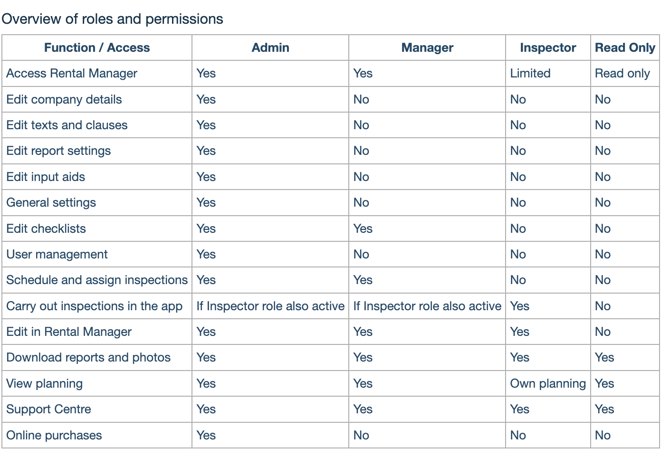
An Admin user always has access to the full system and can manage all settings – such as adding or deactivating users, editing checklists, texts and clauses, updating the logo and colours for reports, and more.
In addition, an Admin can purchase user licenses and credits.
If you only have one user, you are automatically the Admin of your company account.
Manager
A Manager always has access to the Rental Manager and can:
-
edit checklists,
-
schedule and assign inspections,
-
and edit completed inspections.
However, Managers do not have access to company settings such as texts, clauses or user management. A Manager cannot make online purchases.
Inspector
These are the users who actually carry out inspections (via the app) and have limited access to the Rental Manager (unless they also have the Admin or Manager role – see above).
They can edit their completed reports in the Rental Manager and generate new ones.
An Inspector (without an additional Admin or Manager role) only sees their own properties and assignments in the Rental Manager.
To assign an inspection to a user, the Inspector role must be activated. This is why the Inspector role can be combined with Admin or Manager – meaning an Admin or Manager can also act as an Inspector.
Read Only
This user can only consult the Rental Manager – for example, to check the planning and overview of inspections. This is useful for an administrative assistant or accountant who needs to follow up.