
You can activate your subscription quickly and easily via the Rental Manager.
The Rental Inspector Pro subscription consists of two parts:
-
Users – a fixed annual fee per user.
-
Credits – purchased individually or in a cost-effective bundle (recommended). You need 1 credit for each rental inspection / property inspection that you complete and synchronize.
How do I purchase users and credits?
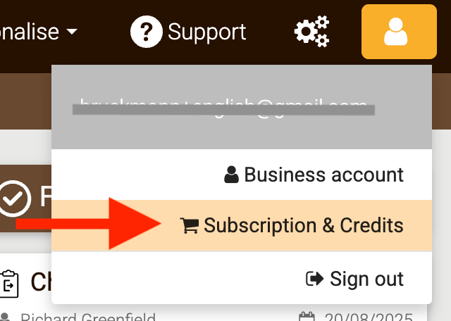
You can activate or renew your annual per-user subscription and purchase credits in the Rental Manager via Account > Subscription & credits in the main menu:
Users (260 euros per year)
Choose the number of users you need. Once the licenses have been purchased, you can create additional users in the Rental Manager. They will automatically receive an email with an activation link.
Data storage is included in the per-user subscription. So there are no surprises afterwards: all your photos and all your reports are securely stored centrally in the cloud, with no data limit.
Credits
Credits are required to create and send reports. You can purchase them individually or in a bundle at a more advantageous price.
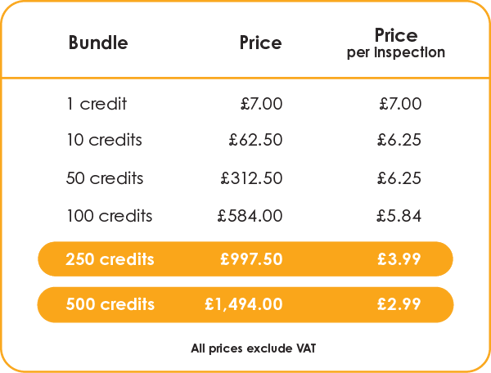
Each time you complete a rental inspection in the app and synchronise it, 1 credit is deducted from your balance. Any post-processing or the generation of additional documents (such as an addendum report) in the Rental Manager does not cost any credits. You therefore only pay 1 credit per property inventory/rental inspection.
When your credits are (almost) used up, simply order more in the Rental Manager.
Purchased credits remain valid indefinitely and do not need to be used within a year, provided that you continue to renew your subscription per user.
You can pay for your order online using Bancontact (Belgium), iDeal, SOFORT, Visa, MasterCard, American Express, Google Pay and Apple Pay, among others. Online payments are made securely via our payment provider Stripe.
For every online purchase, you will receive an invoice for your accounts by email within three working days.
For professional customers within the EU:
If your company is based in an EU country other than Belgium and you have a valid VAT number for that member state, the VAT will be automatically reversed. This means that you do not pay VAT to Chapps. Of course, you must still account for this purchase in accordance with the tax rules of your country.
Belgian customers, both businesses and individuals, always pay 21% VAT. Customers in other EU countries who are individuals or do not have a VAT number pay the VAT rate of their home country (e.g. 21% VAT for the Netherlands, 20% for France and 19% for Germany).
For professional customers outside the EU:
Is your company based outside the European Union (e.g. the United Kingdom, Switzerland, Norway, Iceland, Liechtenstein, the United States, Canada, etc.)? Then you do not pay VAT on your purchase. Depending on your location, you can pay in Euro, GBP, USD or CAD.
Do you pay via a monthly or annual invoice (Premium)?
Then you can order additional user licences here. The added user licences will then be charged pro rata. Orders can only be placed by users with Administrator rights.
All prices listed on this page are exclusive of VAT.