
Step-by-step instructions
-
Start scheduling the move-out inspection
In Rental Manager, start by scheduling a move-out inspection for the current tenant. -
Enable combined scheduling
During the scheduling process, you will see an option labelled “Prepare a new move-in inspection”. Activate this option: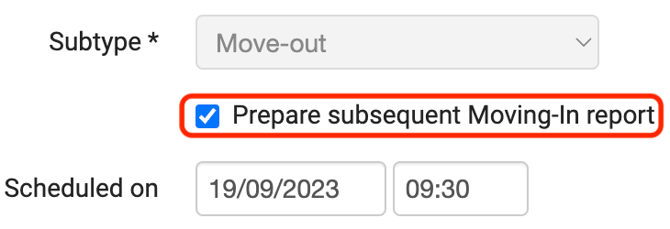
This automatically links the subsequent move-in inspection to the move-out inspection.
-
Complete the inspection details
Once you have completed and sent the move-out inspection, the screen will automatically switch to the preparation of the move-in inspection.
Here you can enter all relevant details for the new tenant and the new rental period. -
Send the assignments to the inspector
After completing both steps, send the assignments. The inspector will receive two separate assignments in the app:
-
The move-out inspection with the departing tenant
-
The move-in inspection with the new tenant
How does this work in the app?
The inspector first completes the move-out inspection and finalises it in the app.
Afterwards, the move-in inspection can be opened.
The app will automatically ask whether data from the move-out inspection should be copied, such as damages, meter readings and key information.
When should you choose “Yes”?
Choose “Yes” if:
-
The move-in inspection takes place immediately after the move-out inspection
-
No repairs or changes were made between the two inspections
-
Meter readings and key information are still largely the same
This is typically the case when the new tenant arrives shortly after the previous tenant has left.